

Stormshield
This guide explains how to protect the Stormshield SSL VPN with Ironchip over RADIUS through NPS.
Requirements
Section titled “Requirements”- Access to the Ironchip admin console.
- A Windows server with the NPS role installed.
- A RADIUS client created in NPS that points to the Stormshield IP, with its shared secret.
- A user with the permissions needed to make changes in Stormshield.
Configure Stormshield
Section titled “Configure Stormshield”Server configuration
Section titled “Server configuration”Sign in as an administrator.
-
Go to Objects > Network Objects, click +Add, and create an object named
Ironchip. -
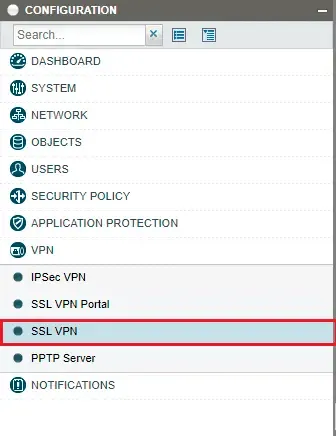
Go to VPN > SSL VPN.
-
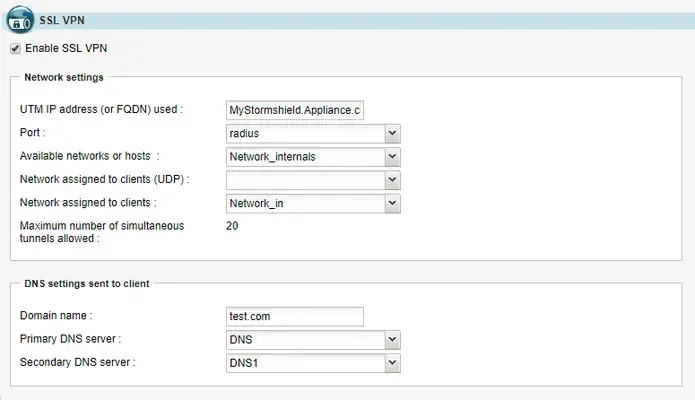
In the General window, select Enable SSL VPN. In the same window, configure the application servers, web servers, and user profiles according to your needs.
-
Go to Users > Authentication. On the General tab, enable the Captive Portal.
-
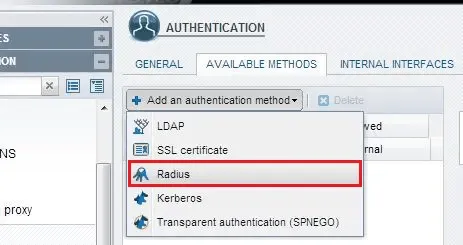
On the Available Methods tab, click Add an authentication method and select Radius.
-
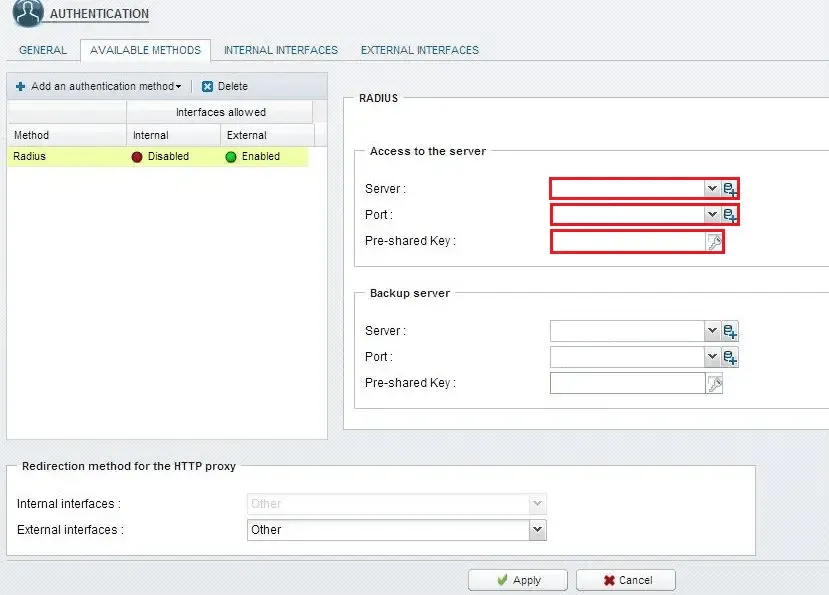
Under Access to the server, fill in the RADIUS configuration and click Apply:
- Server: the network object that corresponds to the NPS server.
- Port: the RADIUS port NPS listens on.
- Pre-shared Key: the shared secret of the RADIUS client configured in NPS for Stormshield.
If you have a second NPS server, configure it under Backup server.
RADIUS timeout
Section titled “RADIUS timeout”To configure the RADIUS timeout, run these commands:
CONFIG AUTH RADIUS timeout=30000 retry=1 btimeout=30000 bretry=1CONFIG AUTH ACTIVATEVerify the integration
Section titled “Verify the integration”Give users access to the application created in the Ironchip admin console. Sign in to the SSL VPN as one of them: after you enter your username and password, you are asked to authenticate with Ironchip.
Troubleshooting
Section titled “Troubleshooting”- Authentication fails with a timeout: check that you ran the RADIUS timeout commands (
timeout=30000andretry=1for the primary and backup servers), to give the user time to respond to Ironchip. - The RADIUS server rejects the connection: check that the Stormshield IP is configured as a RADIUS client in NPS and that the shared secret is the same in Pre-shared Key and in NPS.
Was this page helpful?
Thank you. We will use it to improve the documentation. If you want to tell us what is missing or unclear, write to support@ironchip.com.