

The admin console
The Ironchip admin console is the tool you use to manage the security and access of the users in your company: applications, users, groups, devices, safe zones, and permissions. This page explains how to sign in, what the Get started screen offers, and what each section of the menu does.
What it is for
Section titled “What it is for”With the console you manage all the services and users of the company and control every access. You can also:
- Follow authorizations in real time, with metrics and activity logs.
- Detect intruders with the Ironchip intrusion detection system (ITDR).
- Check the contracted license and its usage.
Sign in to the console
Section titled “Sign in to the console”- Go to https://app.ironchip.com/.
- Enter the email address you registered with.
- Start the authentication process.
The Get started screen
Section titled “The Get started screen”When you sign in to the console, the Get started screen shows one card for each main task. The Let’s go! button on each card takes you straight to the section where you do it.
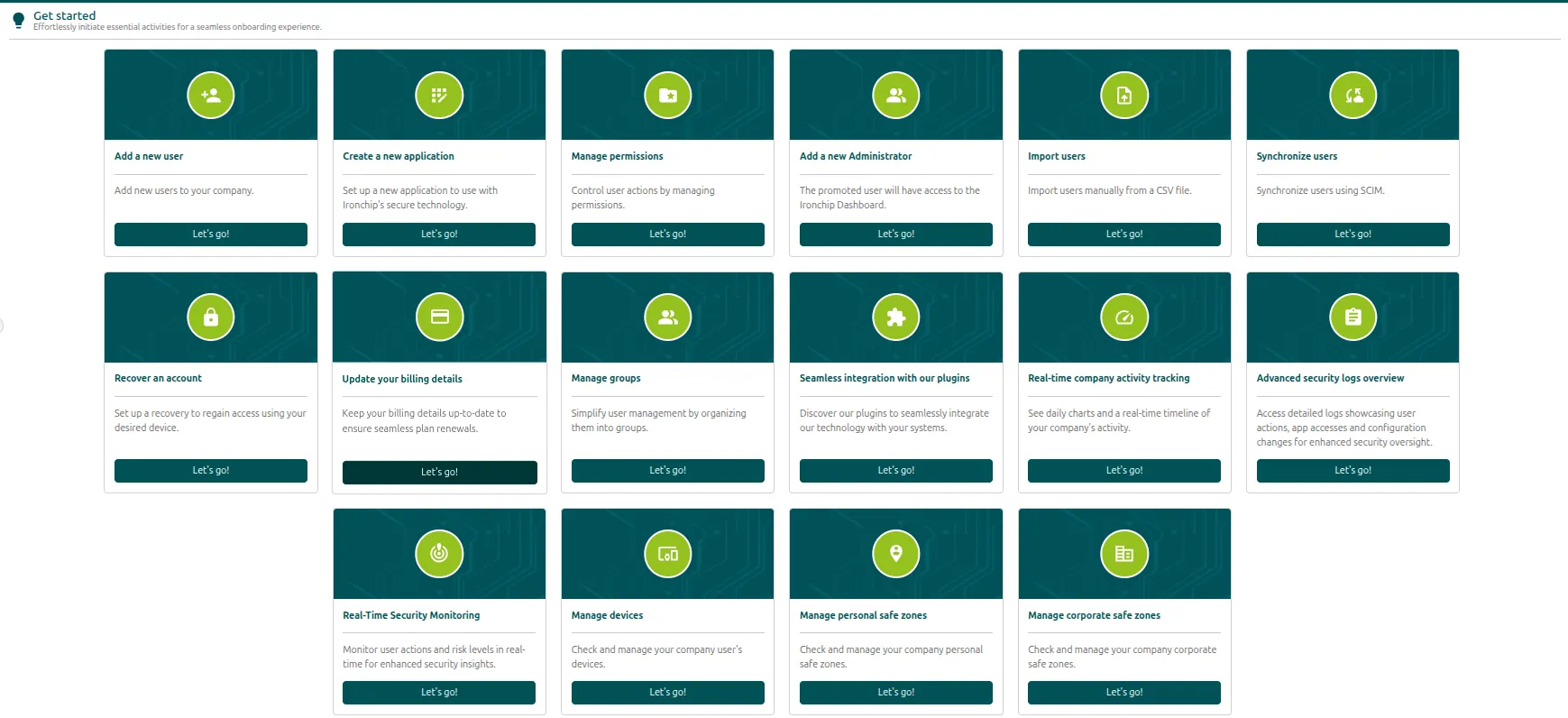
| Card | What it is for | More information |
|---|---|---|
| Add a new user | Add users to the company. | Add a user |
| Create a new application | Add a protected application. | Applications |
| Manage permissions | Control what administrators can do through permissions. | Roles and permissions |
| Add a new Administrator | Give a user access to the console. | Assign an administrator |
| Import users | Import users manually from a CSV file. | Identity synchronization |
| Synchronize users | Synchronize users with SCIM. | Identity synchronization |
| Recover an account | Set up a recovery to regain access from the device you choose. | Recover a device |
| Update your billing details | Keep your billing details up to date. | Billing and licenses |
| Manage groups | Organize users into groups. | Groups |
| Seamless integration with our plugins | Download the plugins for the integrations. | Console plugins |
| Real-time company activity tracking | See the daily charts and the timeline of the company activity. | Metrics |
| Advanced security logs overview | See detailed logs of actions, accesses, and configuration changes. | Activity logs |
| Real-Time Security Monitoring | Follow user actions and their risk levels in real time. | ITDR |
| Manage devices | Check and manage the devices of the company. | Devices |
| Manage personal safe zones | Check and manage the personal safe zones. | Safe zones |
| Manage corporate safe zones | Check and manage the corporate safe zones. | Corporate safe zone |
If this is your first Ironchip rollout, follow the Get started guide: it lists, in order, the six tasks a rollout begins with.
Menu map
Section titled “Menu map”The side menu of the console has this structure:
Get startedApplicationsDirectory Users Groups Devices Mobile Desktop RFID Safe zone Personal Corporate SynchronizationAuthentication policies Device policies Safe zone policies Password policiesSecurity Permissions IP allowlist CredentialsMonitoring Logs Metrics SIEM integrationITDR Realtime feed Threat analysis Ruleset ToolsetPluginsAccount settings Billing Look & feelWhat each section does
Section titled “What each section does”The sections follow the order of the menu.
| Section | What you can do | More information |
|---|---|---|
| Applications | Add protected services, create HTTP-MFA integrations, and grant access to users or groups. | Applications |
| Directory > Users | Add users, check their protection status, and manage their accounts. | Users and groups |
| Directory > Groups | Organize users into groups and subgroups. | Groups |
| Directory > Devices | See the users’ mobile and desktop devices and RFID cards. | Devices |
| Directory > Safe zone | Create and share personal and corporate safe zones. | Safe zones |
| Directory > Synchronization | Synchronize users by CSV, LDAP, or SCIM. | Identity synchronization |
| Authentication policies | Group devices and safe zones into access policies and integrate LDAP passwords. | Authentication policies |
| Security > Permissions | Define which groups of administrators can access which console resources. | Roles and permissions |
| Monitoring > Logs and Metrics | Review the activity logs and the authentication metrics. | Activity and metrics |
| Monitoring > SIEM integration | Send the authentication events to your SIEM. | SIEM integration |
| ITDR | Follow in real time the anomalies detected during authentication (Realtime feed), analyze threats (Threat analysis), and manage the rules (Ruleset). | ITDR |
| Plugins | Download the plugins for the integrations (Windows NPS, ADFS, LDAP, Ironchip Logon, RADIUS, and AD Connect). | Console plugins |
| Account settings > Billing | Check your plan, its usage, and the billing details. | Billing and licenses |
Was this page helpful?
Thank you. We will use it to improve the documentation. If you want to tell us what is missing or unclear, write to support@ironchip.com.