

Request access
This page explains how to request a privileged access window and what happens until you can connect. It is for administrators and external vendors who need to get into a server, a database or a cluster.
Before you start
Section titled “Before you start”- You must be in the group of an access that reaches the resource. If there is nothing to request, the console tells you: ask an administrator to add you to the group.
- Connect from your registered device and from an allowed place: Ironchip checks it on every connection.
What you already have
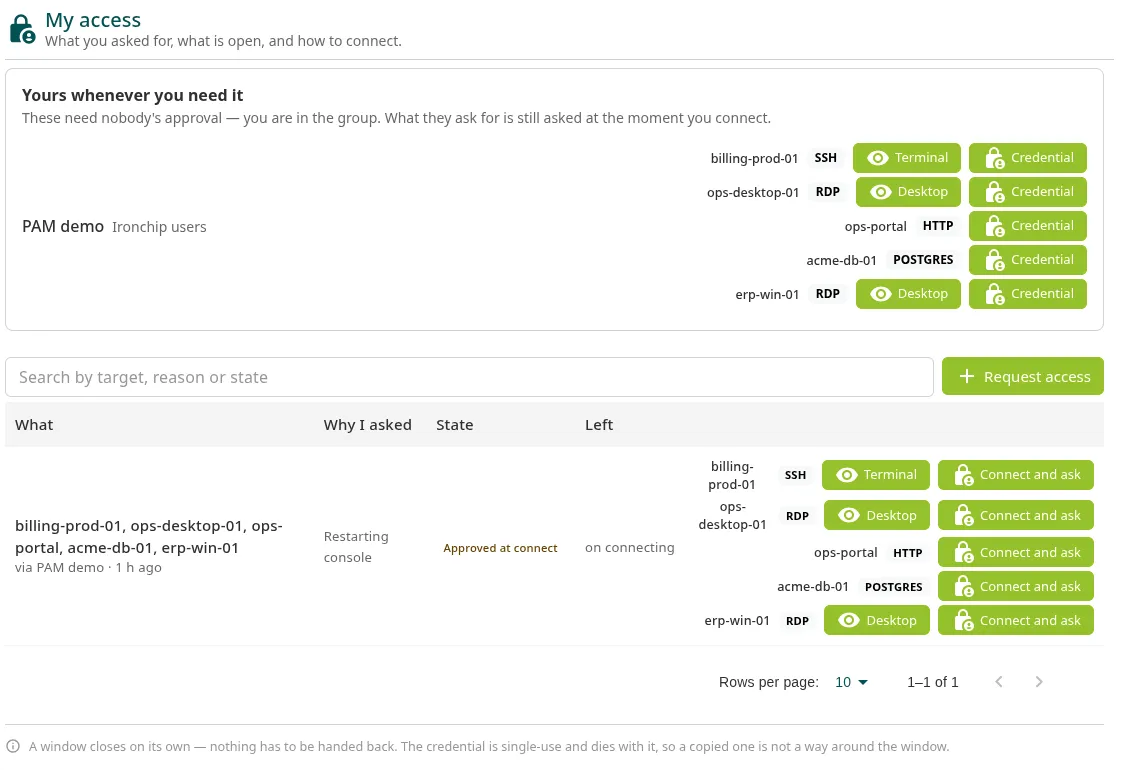
Section titled “What you already have”Go to PAM > My access. At the top, Yours whenever you need it shows the accesses that do not need approval: you can connect whenever you want. You are still asked for the access’s factors when you connect.
Request a window
Section titled “Request a window”- In PAM > My access, click Request access.
- In Target, choose the access: it appears with its protocols and the group through which you have it.
- In For how long, choose the window length, from 15 minutes to 8 hours. The options are limited to what the approval policy allows.
- In Reason, explain what you need it for, in at least 15 characters. It is the first thing the approver reads, and the first thing whoever audits the access will read later.
- Click Ask.
Below the reason, the dialog tells you how many people have to approve and when they are asked.
What happens next
Section titled “What happens next”The request appears in the My access table with its status:
| Status | What it means |
|---|---|
| Waiting for approval | Waiting for the approvers. The Left column shows how many approvals it has. |
| Approved at connect | It is approved when you connect: approvers receive nothing until you connect, and your connection is held while they decide. |
| Open | The window is open. Left shows the time remaining. |
| Denied | It was denied. |
| Closed | The window closed when its time ran out. |
When the window is open, the buttons to connect appear next to each machine. See Connect to a resource.
- Nobody approves their own request: you need another person.
- The window closes on its own when its time runs out. There is nothing to give back.
- What you do inside is recorded from start to finish.
Was this page helpful?
Thank you. We will use it to improve the documentation. If you want to tell us what is missing or unclear, write to support@ironchip.com.