

Exposure
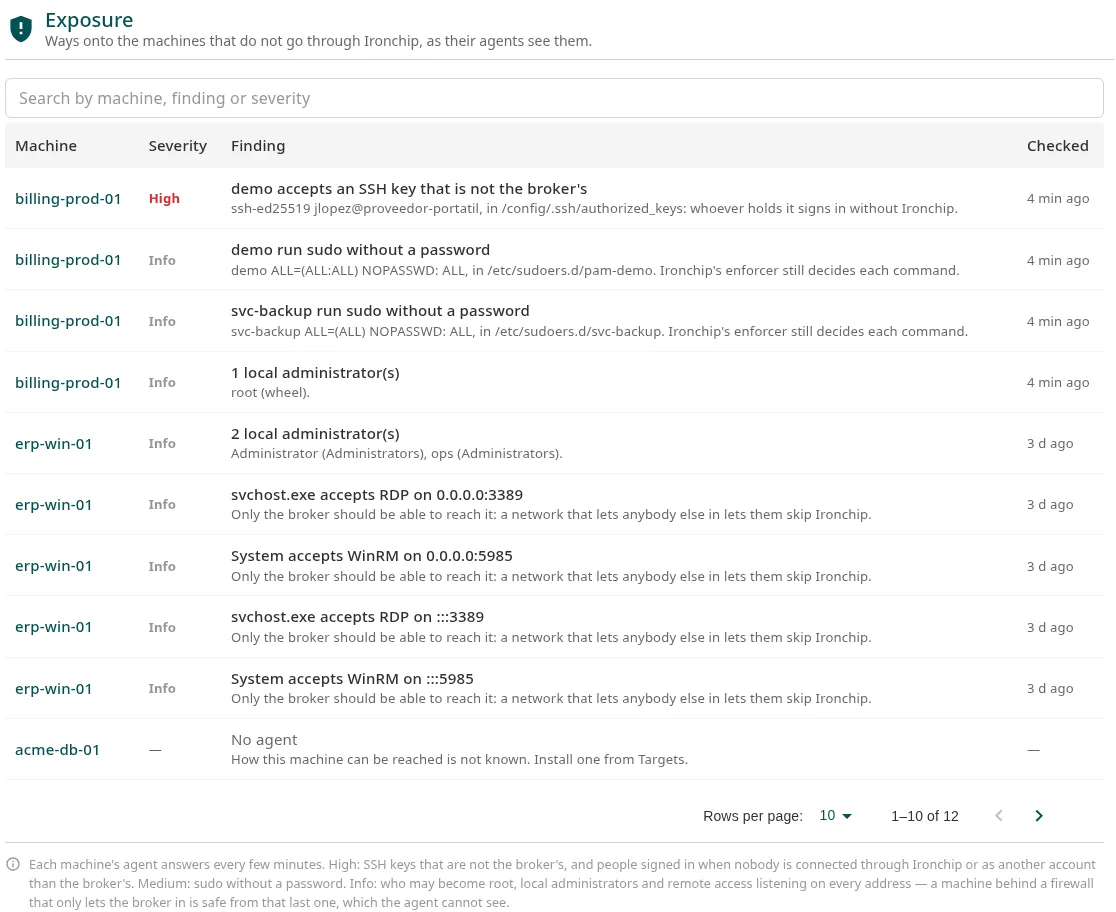
This page explains exposure: the ways into a machine that do not go through Ironchip, as its agent sees them. Use it to close the back doors that would make access control useless. It is for whoever administers the machines.
Requirements
Section titled “Requirements”The agent (osquery) installed on the machine. The agent checks the machine every few minutes.
View exposure
Section titled “View exposure”Go to PAM > Hosts > Exposure to see every machine, or open the Exposure tab on a resource’s page. The Targets list also flags high and medium findings.
What it looks for
Section titled “What it looks for”| Severity | Finding | Systems | What to do |
|---|---|---|---|
| High | An account accepts an SSH key that is not the broker’s | Linux and macOS | Remove the key from authorized_keys, or verify it if it belongs to an automated process. |
| High | Someone is signed in while nobody is connected through Ironchip, or is signed in with an account other than the broker’s | All | Find out who it is and how they got in. |
| Medium | Someone can run sudo without a password |
Linux and macOS | If the machine has the enforcer, it drops to Info: Ironchip still decides every command. |
| Info | Who can become root | Linux and macOS | Check that they are the expected accounts. |
| Info | How many local administrators there are | All | Check that they are the expected ones. |
| Info | A program accepts SSH, RDP, VNC or WinRM on all addresses | All | If a firewall only lets the broker in, there is no risk, but the agent cannot see that. |
The list also shows the machines without an agent (No agent), the ones that have not responded yet (Waiting for the agent) and the ones with nothing found (Nothing found).
More information
Section titled “More information”- Accounts: the account inventory of each machine.
- Agent on the machines
Was this page helpful?
Thank you. We will use it to improve the documentation. If you want to tell us what is missing or unclear, write to support@ironchip.com.