

Flutter SDK
The Ironchip Flutter plugin bundles the Android and iOS SDKs so you can send transactions to the fraud engine from a Flutter app with a single codebase.
Requirements
Section titled “Requirements”| Platform | Supported versions |
|---|---|
| Android | 5.0.0+ |
| iOS | 13.0.0+ |
Installation
Section titled “Installation”The plugin is published on pub.dev as ironchip_lbfraud. Add it to your package’s pubspec.yaml file:
dependencies: ironchip_lbfraud: ^2.0.13Android permissions
Section titled “Android permissions”A few permissions are recommended to use fraud detection on Android. The plugin works without them, but accuracy drops. Add them to your app to get the most out of it:
<uses-permission android:name="android.permission.ACCESS_FINE_LOCATION" /><uses-permission android:name="android.permission.ACCESS_COARSE_LOCATION" />
<uses-permission android:name="android.permission.ACCESS_WIFI_STATE" /><uses-permission android:name="android.permission.CHANGE_WIFI_STATE" />
<uses-permission android:name="android.permission.INTERNET" />
Remember that the user has to grant the permissions for them to take effect.
iOS setup
Section titled “iOS setup”To use Ironchip LBFraud, add a capability to your app target: go to Signing & Capabilities and add Access WiFi Information.
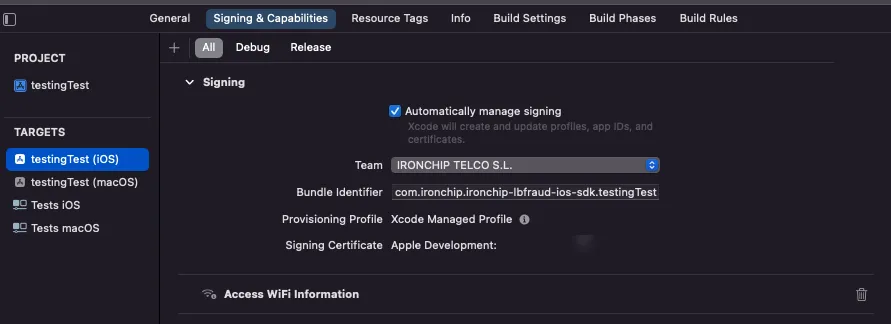
Then add these keys to the Info.plist file. For each one, write the description as a text string:
Privacy - Location Always and When In Use Usage DescriptionPrivacy - Location When In Use Usage DescriptionPrivacy - Location Always Usage DescriptionLSApplicationQueriesSchemesLSApplicationQueriesSchemes is used to detect whether the device is jailbroken.
With the project configured and the permissions granted, import the package:
import 'package:ironchip_lbfraud/ironchip_lbfraud.dart';To send a transaction, first initialize the SDK with a valid API key.
// Replace APIKEY with the generated API key.// By default the plugin targets the production environment. To target a different one:// LBFraudSDK fraud = new LbfraudFlutterPlugin.initFraudSDK("APIKEY", env: Environment.testing);await _lbfraudPlugin.initFraudSDK(apiKey);Once the service is initialized, you can send transactions:
try {  // transactionID (required, unique): identifier you will later use to request the report  // userID (required): user identifier  // extraData (optional): extra information for analysis  // You can omit the await if you don't need the result of the action.  var result = await _lbfraudPlugin.sendTransaction(transactionID, userID, {});
  _showResult = result!;  _resultError = false;} catch (e) {  _showResult = e.toString();  _resultError = true;}
sendTransaction is asynchronous, but you don’t need to use await unless you want to check the result of the action.
Configure a proxy
Section titled “Configure a proxy”If you want to use a specific proxy when sending a transaction, configure it with setProxy:
try { var result = await _lbfraudPlugin.setProxy(host, port);} catch (e) {}Example
Section titled “Example”Full example app: it initializes the plugin with the API key the user types and sends a transaction with a random identifier.
import 'package:flutter/material.dart';import 'dart:async';import 'dart:math';
import 'package:flutter/services.dart';import 'package:ironchip_lbfraud/ironchip_lbfraud.dart';
void main() {  runApp(const MyApp());}
class MyApp extends StatefulWidget {  const MyApp({super.key});
  @override  State<MyApp> createState() => _MyAppState();}
class _MyAppState extends State<MyApp> {  final _lbfraudPlugin = IronchipLbfraud();  String apiKey =      "APIKEY"; // Replace APIKEY with the generated API key.  bool _isLbfraudInitialized = false;
  String userID = "john.doe@gmail.com"; // User identifier  String _showResult = "";  bool _resultError = false;
  @override  void initState() {    super.initState();  }
  // LBFraud methods are asynchronous, so they are initialized in an asynchronous method.  Future<void> initLBFraudState() async {    try {      // Replace APIKEY with the generated API key.      // By default the SDK targets the production environment. To target a different one:      // LBFraudSDK fraud = new LbfraudFlutterPlugin.initFraudSDK("APIKEY", env: Environment.testing);      await _lbfraudPlugin.initFraudSDK(apiKey);
      _isLbfraudInitialized = true;    } catch (e) {      _isLbfraudInitialized = false;    }
    setState(() {      _isLbfraudInitialized = _isLbfraudInitialized;    });  }
  String generateRandomTransactionID(int length) {    const _chars =        'AaBbCcDdEeFfGgHhIiJjKkLlMmNnOoPpQqRrSsTtUuVvWwXxYyZz1234567890';    Random _rnd = Random();
    return String.fromCharCodes(Iterable.generate(        length, (_) => _chars.codeUnitAt(_rnd.nextInt(_chars.length))));  }
  Future<void> sendTransaction() async {    try {      // transactionID (required, unique): identifier you will later use to request the report      // userID (required): user identifier      // extraData (optional): extra information for analysis      // You can omit the await if you don't need the result of the action.
      var result = await _lbfraudPlugin          .sendTransaction(generateRandomTransactionID(10), userID, {});
      _showResult = result!;      _resultError = false;    } catch (e) {      _showResult = e.toString();      _resultError = true;    }
    setState(() {      _resultError = _resultError;      _showResult = _showResult;    });  }
  @override  Widget build(BuildContext context) {    return MaterialApp(        home: Scaffold(      appBar: AppBar(        title: const Text('Ironchip LBFraud example app'),        backgroundColor: Color(0xFF005255),      ),      body: Container(        margin: EdgeInsets.all(40.0),        child: Center(          child: Column(            mainAxisAlignment: MainAxisAlignment.center,            children: <Widget>[              TextField(                onChanged: (value) {                  apiKey = value;                },                decoration: const InputDecoration(labelText: "API Key"),              ),              SizedBox(height: 20),              Text(                _isLbfraudInitialized                    ? "LBFraud initialized"                    : "LBFraud is not initialized",                style: TextStyle(                  color: _isLbfraudInitialized                      ? Colors.green                      : Color(0xFFF44336),                ),              ),              SizedBox(height: 20),              ElevatedButton(                onPressed: initLBFraudState,                style: ElevatedButton.styleFrom(                  backgroundColor: Colors.green,                ),                child: Text('Initialize LBFraud'),              ),              TextField(                onChanged: (value) {                  userID = value;                },                decoration: const InputDecoration(labelText: "User ID"),              ),              SizedBox(height: 20),              ElevatedButton(                onPressed: _isLbfraudInitialized ? sendTransaction : null,                style: ElevatedButton.styleFrom(                  backgroundColor: Colors.green,                ),                child: Text('Send Transaction'),              ),              SizedBox(height: 20),              Text(                _showResult,                style: TextStyle(                  color: _resultError ? Color(0xFFF44336) : Colors.black,                ),              ),            ],          ),        ),      ),    ));  }}
Changelog
Section titled “Changelog”2.0.13 (2024-01-16)
Section titled “2.0.13 (2024-01-16)”- Android SDK:
1.2.13 - iOS SDK:
1.2.10
Changed
- Plugin documentation updated.
2.0.12 (2023-10-17)
Section titled “2.0.12 (2023-10-17)”- Android SDK:
1.2.13 - iOS SDK:
1.2.10
Changed
- Version 0.0.1 is promoted to 2.0.12 for organizational reasons.
0.0.1 (2023-10-17)
Section titled “0.0.1 (2023-10-17)”- Android SDK:
1.2.13 - iOS SDK:
1.2.10
Changed
- Project setup.
Was this page helpful?
Thank you. We will use it to improve the documentation. If you want to tell us what is missing or unclear, write to support@ironchip.com.