

Risk assessment
Ironchip evaluates every operation that arrives from the SDK and assigns it a risk level. The level summarizes how confident the engine is that the legitimate user performed the action from a usual context.
Risk levels
Section titled “Risk levels”Ironchip can return four types of risk assessments.
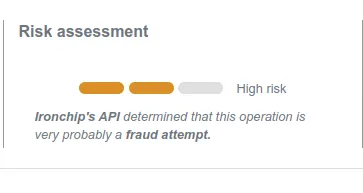
| Level | Meaning | Recommendation |
|---|---|---|
fraud |
The action is considered fraudulent or part of an ongoing fraud. | Block the operation and review the case. |
high_risk |
The action is potentially fraudulent. | Ask for additional verification before continuing. |
low_risk |
The action is safe. | Continue as usual. |
unknown_risk |
There is not enough data to assess. | Apply the application’s default policy. |
The level reaches the customer in the event.risk_assignment field of the report and comes with the evidence and decisions that justify it.
Evidence
Section titled “Evidence”Ironchip bases its risk assessments on evidence, which comes from different analyses through distinct lenses. The console groups the evidence into five blocks. For the sensor match types and the decisions that accompany an assessment, see Evidence and decisions. To interpret the behaviors, warnings, and frauds the engine detects, see the user guide.
Device integrity
Section titled “Device integrity”Shows whether the device data can be trusted.
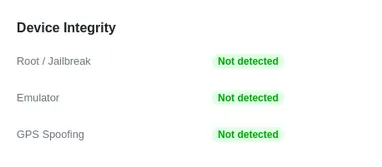
| Evidence | Description | Possible values |
|---|---|---|
| Root / Jailbreak | Indicates whether the device has root access or a jailbreak. | Detected, Not detected |
| Emulator | Indicates whether the device is an emulator or simulator. | Detected, Not detected |
| GPS Spoofing | Indicates whether the device has an app that can fake GPS data. | Detected, Not detected |
Device reputation
Section titled “Device reputation”Provides data about the device’s reputation, based on the Ironchip network effect and the device’s behavior.
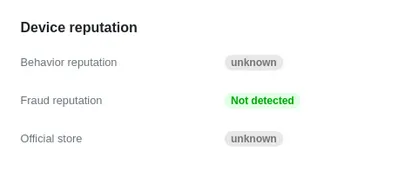
| Evidence | Description | Possible values |
|---|---|---|
| Behavior reputation | Indicates whether the device behaves suspiciously or is a trusted device. | Suspect: behaves like high-risk devices but is not associated with any known fraud.Allowed: was set as the main device of an account.Unknown: Ironchip has neither a positive nor a negative impression of the device. This is the default when data is insufficient. |
| Fraud reputation | Indicates whether the device was previously linked to a fraud report or was verified. | Confirmed fraud: related to previously detected or reported fraud. This is a global status.Allowed: its relation to a given account was reported as verified through the feedback APIs. This status is local to the customer.Unknown: Ironchip has neither a positive nor a negative impression of the device. This is the default when data is insufficient. |
| Official store | Indicates whether the mobile app was installed from an official store such as Google Play or the App Store. | Yes, No |
Location behavior
Section titled “Location behavior”Provides information about the device’s location behavior and its relation to the associated account.
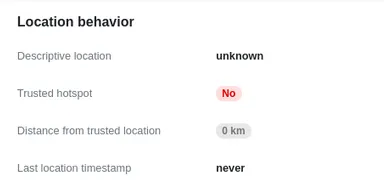
| Evidence | Description |
|---|---|
| Descriptive location | To be documented. |
| Trusted hotspot | To be documented. |
| Distance from trusted location | Indicates the distance from the device to the closest location the associated account is known to frequent. |
| Last location timestamp | Indicates the timestamp of the device location that is considered to match the trusted location. |
Location sensors
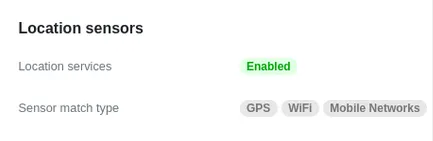
Section titled “Location sensors”Indicates which device sensors were used for the location-related evidence.
| Evidence | Description | Possible values |
|---|---|---|
| Location services | Indicates whether the user allows location services. | Enabled: the user allowed the app to access location services.Disabled: the user rejected the request to access location services. |
| Sensor match type | Indicates which type of sensor match was used to compare location data. | GPS: comparisons are made with GPS data.WiFi: comparisons are made with Wi-Fi sensors.Connected WiFi: comparisons are made with the Wi-Fi network the user is connected to.Mobile Networks: comparisons are made with connected mobile networks. |
IP reputation
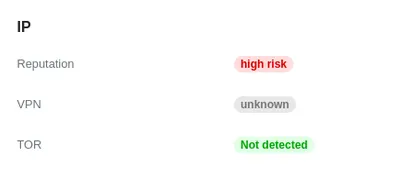
Section titled “IP reputation”Provides information about the device’s behavior and the declared address.
| Evidence | Description | Possible values |
|---|---|---|
| Reputation | Indicates whether a detected IP address is suspected of being fraudulent. | High risk, Medium, Low risk |
| VPN | Indicates whether a detected IP address was going through a VPN or proxy. | Detected, Not detected, Unknown |
| TOR | Indicates whether a detected IP address was going through the TOR network. | Detected, Not detected, Unknown |
Was this page helpful?
Thank you. We will use it to improve the documentation. If you want to tell us what is missing or unclear, write to support@ironchip.com.