

How Phishing Shield works
Phishing Shield is a phishing protection solution that works directly in the browser, in real time. It detects and blocks malicious pages before users can fall for them.
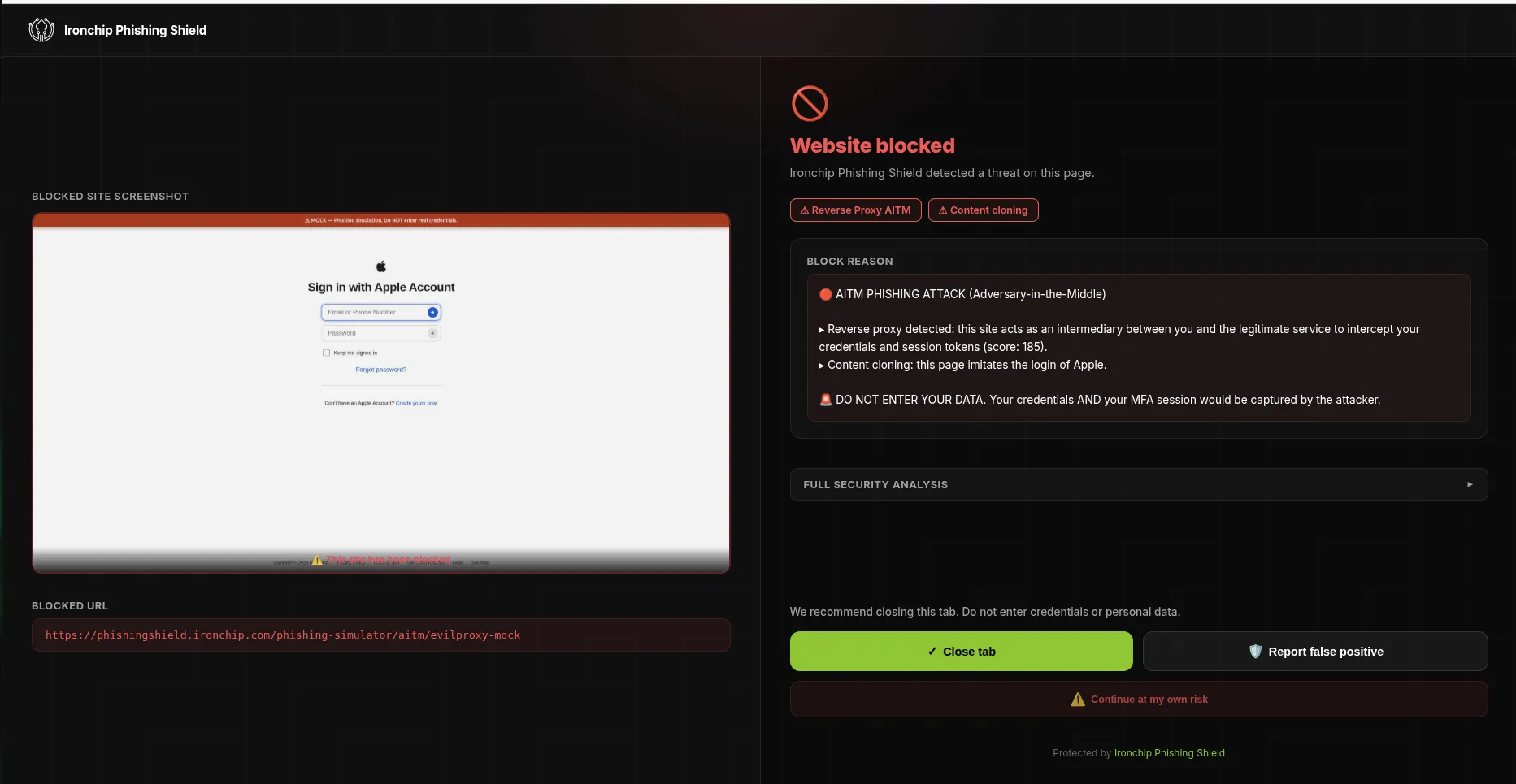
How it works
Section titled “How it works”When a user tries to open a web page, Phishing Shield analyzes the site and checks whether it shows signs of phishing or belongs to a set of domains identified as potentially malicious.
What problem it solves
Section titled “What problem it solves”Phishing Shield protects your users from reaching fraudulent sites, identity impersonation and credential theft, and neutralizes malicious links before they have an impact.
Types of phishing it detects
Section titled “Types of phishing it detects”Phishing Shield is designed to detect the different techniques attackers use to deceive users, from fake pages to more advanced methods of stealing information:
- Fake pages: websites that imitate well-known services and brands to deceive the user.
- Deceptive domains: web addresses very similar to the originals, with swapped letters or characters.
- Impersonation: pages that pose as legitimate companies or services.
- Credential and session theft: attacks designed to obtain passwords or take over signed-in sessions.
- QR code phishing: QR codes that send the user to malicious pages.
- ClickFix: pages that trick the user into performing dangerous actions on their computer.
- Adversary-in-the-middle (AiTM) attacks: advanced techniques that try to intercept the user’s credentials or sessions.
- Hidden pages or pages designed to evade protections: techniques that hide the malicious content to avoid detection.
Phishing Shield combines several detection mechanisms to identify these threats and block them before they have an impact. See the Phishing Shield overview to learn how it is deployed and managed.
The twelve detection engines
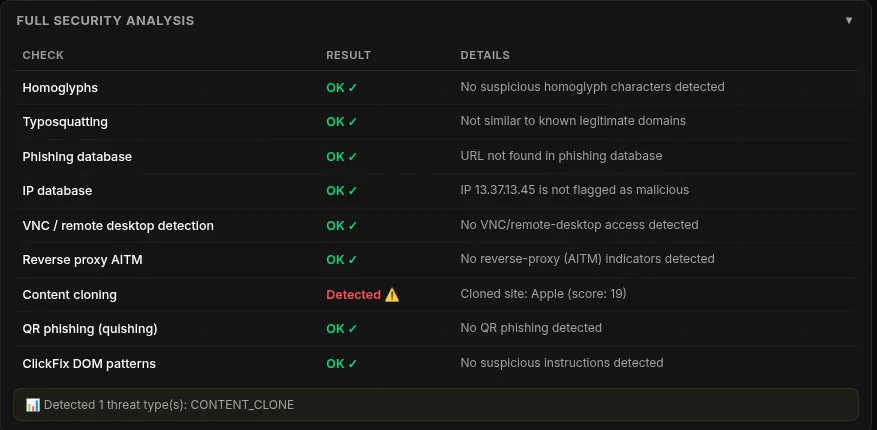
Section titled “The twelve detection engines”Each engine handles a different attack and, together, they also cover the ones that bypass MFA. The screenshot below shows the result of each check in the Full security analysis panel.
- Content cloning: analyzes the structure, elements and visual design of a page to identify cloned sign-in pages, including perfect copies that evade URL filters.
- Typosquatting: detects domains almost identical to the original, such as
g00gle.comormircosoft.com. - Homoglyphs: detects Unicode tricks, such as a Cyrillic “a” posing as a Latin “a”.
- AiTM and reverse proxy: identifies the kits that sit between the user and the service (Tycoon2FA, EvilProxy, Sneaky2FA, Evilginx, Modlishka, Caffeine, Greatness) from the page’s headers, timings and resource patterns.
- ClickFix: intercepts attacks that hijack the clipboard and blocks the malicious PowerShell or curl commands they try to make you run.
- Form hijacking: detects forms that secretly send your credentials to an attacker’s server.
- QR phishing (quishing): detects QR codes that lead to credential-theft pages.
- VNC attacks: stops shared-screen attacks in which the attacker watches what you type in real time.
- Session hijacking: watches for token theft even after you have signed in, by observing changes to the browser’s cookies and storage.
- MFA bypass: alerts when an attacker intercepts your second-factor codes in transit by relaying tokens through an AiTM kit.
- Threat intelligence: cross-checks an in-house database of more than one million trusted domains, curated phishing URL lists and more than 18,000 known malicious IPs, updated continuously.
- Phishing database: blocks known phishing sites before the user sees the page, using the PhishTank and OpenPhish feeds.
What happens when a threat is detected
Section titled “What happens when a threat is detected”When Phishing Shield detects a possible threat, it acts automatically to protect the user:
- Detects the possible threat while the user browses.
- Blocks access to the page so the user cannot interact with it.
- Informs the user with a warning screen.
- Logs the attempt so the organization knows about the threat detected and the user protected.
This way, Phishing Shield steps in in real time and keeps access to a malicious page from turning into a security incident.
Was this page helpful?
Thank you. We will use it to improve the documentation. If you want to tell us what is missing or unclear, write to support@ironchip.com.