![01_1-ironchip_logo_articulación horizontal_ppal.png]](https://docs.ironchip.com/hs-fs/hubfs/01_1-ironchip_logo_articulacio%CC%81n%20horizontal_ppal.png?height=40&name=01_1-ironchip_logo_articulacio%CC%81n%20horizontal_ppal.png)
Stormshield Configuration
Server Configuration
To perform the integration, you need to be logged in as an administrator.
-
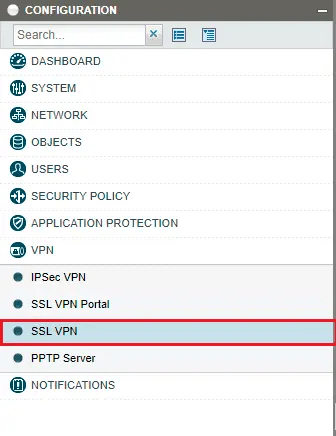
In the Objects > Network Objects section and select +Add, and create an object named Ironchip.
-
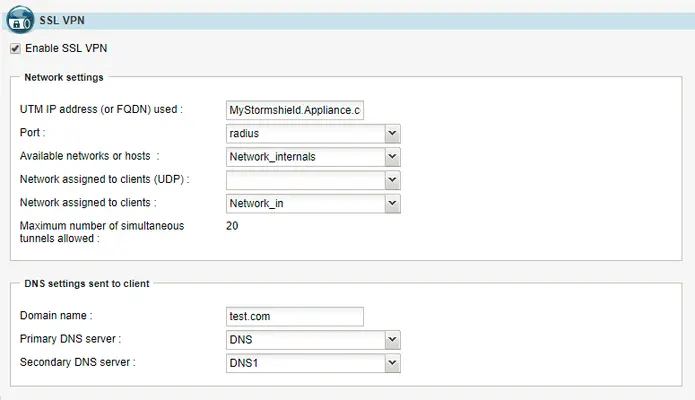
In the VPN/SSL VPN section. In the General window enable SSL VPN. In the same window, configure application servers, web servers and user profiles according to your needs.
-
Now in Users > Authentication section, in General window enable Captive Portal.
-
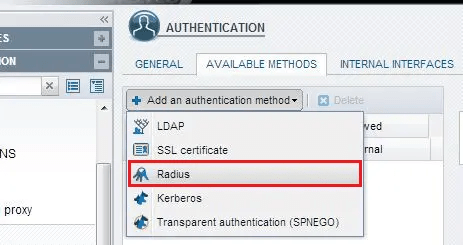
Then in Available Methods, add Radius as an authentication method.
-
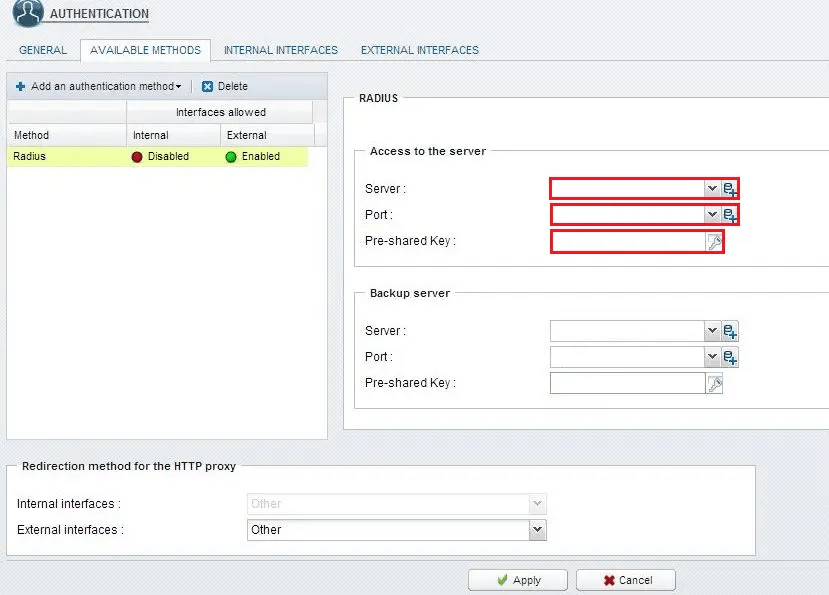
Finally fill in the RADIUS configuration properly and click Apply.
RADIUS timeout configuration
To configure RADIUS timeout, use these command lines:
CONFIG AUTH RADIUS timeout=30000 retry=1 btimeout=30000 bretry=1
CONFIG AUTH ACTIVATE


