![01_1-ironchip_logo_articulación horizontal_ppal.png]](https://docs.ironchip.com/hs-fs/hubfs/01_1-ironchip_logo_articulacio%CC%81n%20horizontal_ppal.png?height=40&name=01_1-ironchip_logo_articulacio%CC%81n%20horizontal_ppal.png)
Add Ironchip to Hubspot via OTP
-
Log in to your account and go to Settings > Security > Two-factor authentication.
-png.png?width=649&height=772&name=Untitled%20(19)-png.png)
-
Select Authentication App.
-png.png?width=642&height=764&name=Untitled%20(18)-png.png)
-
Finally scan the QR with the Ironchip app.
-png.png?width=646&height=573&name=168837200745449509(1)-png.png)
-
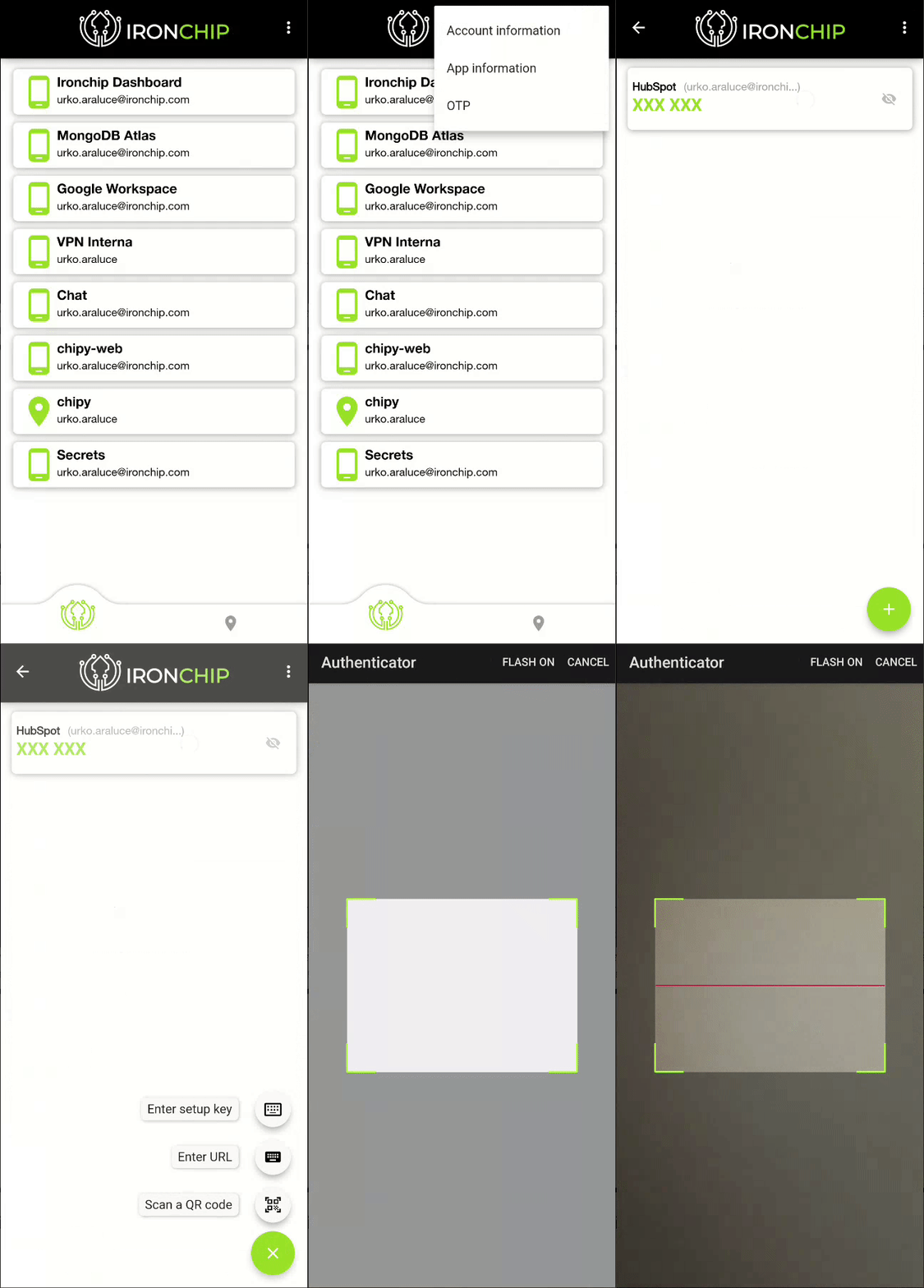
To scan the QR code in the Ironchip app, go to Three dots > OTP > + > Scan a QR code.
-
It will ask you to insert a code to do the verification, after that save the backup codes in a safe place and you are done.
-png.png?width=517&height=338&name=Untitled%20(17)-png.png)
Video